
Author: Ali Gheidarpour | Senior Network Consultant and Trainer
Licensing Cisco Products is one of the important topics you need to be familiar with when deciding on your investment with Cisco. There are two different methods: Traditional Licensing and Smart Licensing. Let's start with Traditional to better see Cisco's Licensing development:
In the past, Cisco used the licensing method, which is now called “Traditional Licensing”. It consists of software activation on the specific device by downloading and installing the license file generated by the Product Activation Key (PAK) code.
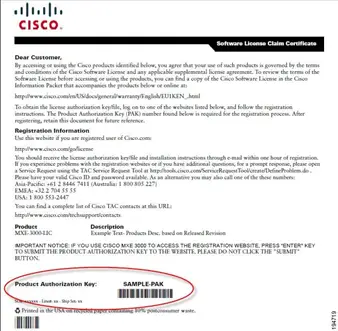
The PAK code was a purchasing option that the customer ordered in the same way they ordered other Cisco devices (equipment). After ordering the PAK for the specific feature set, the next step was to register the PAK code and the serial number of that particular device in the Cisco licensing web portal.
Here is a brief summary of the steps required to register a PAK code:
- First, go to http://www.cisco.com/go/license and sign in using your Cisco account (CCO ID).
The PAKs or Tokens tab is the default view that displays a list of entitlement Paks or Tokens that you have previously ordered and registered. The other tabs are for viewing licenses, devices, and transaction history.
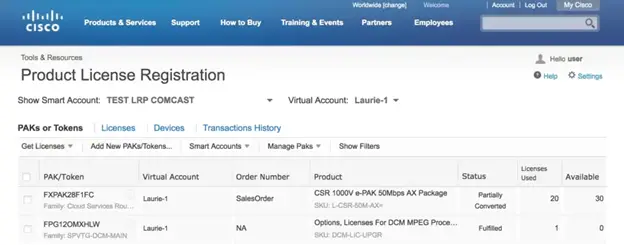
- As a new user, you may have ordered some licensing capabilities or activation for one or more products that you have purchased now and you may have received an email notification with a product authorization key or PAK if you want to create a license. The license registration portal is where you go to redeem this key and it is converted into a license for your product.
- So, in the first tab (PAKs & Tokens) click on “Get Licenses” and then “From a new PAK”
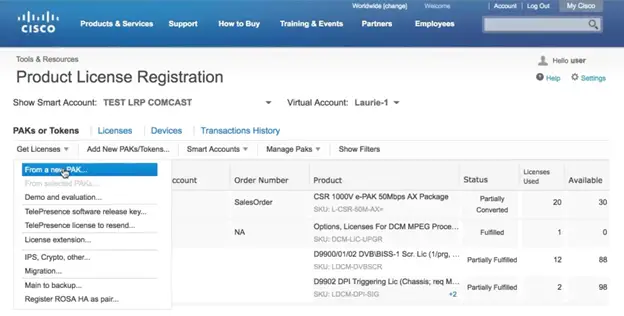
- The Get Licenses page opens, enter your PAK code in the field provided and then click next

- The Assign SKUs window opens, here you can see the license entitlements represented by this PAK, this example shows the corresponding license properties and the number of available licenses for the universal broadband router family.
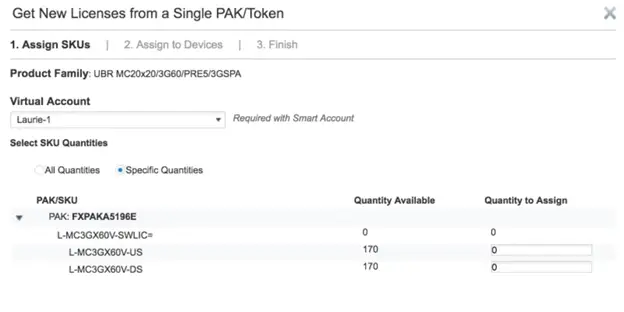
- To add licenses to your product, simply enter the quantity of each feature in the “Quantity to Allocate” fields; depending on the product type, there may be limitations to the quantity of features, in some cases the PAK may contain more entitlements than a single device can support, you will need to enter the maximum supported entitlement in this field.
Once the PAK is registered, the license file is downloaded directly from the Cisco Licensing web page. Cisco usually emails the license file and you will receive information about your PAK registration in less than an hour.
To load the license file onto your Cisco device, the license file must be placed on the device flash memory or other URL accessible by the router. Then, by issuing “license setup” followed by the URL and name of the license file, the license is loaded, then after the reload, the new license is applied to the system and all features related to the new license are activated and ready for use. To ensure that the license is activated after the reload, the show version command shows the fully activated license and related features.
So far, we have covered the Traditional Licensing method which has the following disadvantages:
Limited View:
- Customers don't know what they have, so they need to verify each license and related features on the license portal and on the device itself.
PAK Registration Process:
- There was a separate PAK registration process for each PAK code they purchased, imagine you had hundreds or thousands of devices.
Device Specific:
- Each license was specific to a single device
Locked:
- Only use what you pay for, which means unlocking more features than if you had to buy another separate license, which is inefficient.
In our next blog post, we will cover the new Cisco licensing method and see how Smart Licensing makes your life easier.